
WordPress 6.2 “Dolphy” Walkthrough: New Features and Updates
WordPress 6.2 landed on March 29, 2023. Codenamed “Dolphy” after the jazz multi-instrumentalist Eric Dolphy, it’s the first major release of 2023 and ships more than 900 enhancements and bug fixes from over 600 contributors. The headline change is a big one: the Site Editor is officially out of beta.
Here’s a walkthrough of what’s new, and what it actually means for the way you build and manage WordPress sites.
The Site Editor is out of beta
If you’ve been waiting for full site editing to feel ready, 6.2 is the release to look at. The beta label is gone, and the interface has been rebuilt around a new browsing experience.
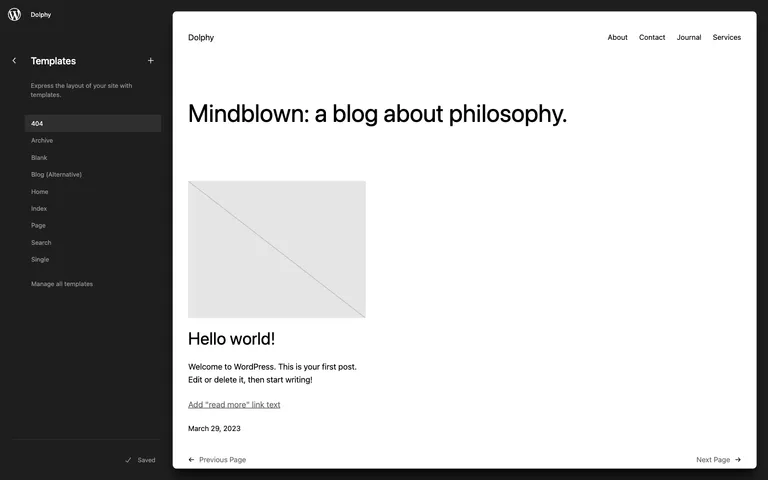
Open the Site Editor on a block theme and you now land in a sidebar where you can browse your templates and template parts, see a full preview of each one, and click through to edit. It’s a small structural change that makes a real difference: you can see what you’re about to change before you change it, and moving between your homepage template, single post template, and header no longer feels like guesswork.
Menus are finally less fiddly
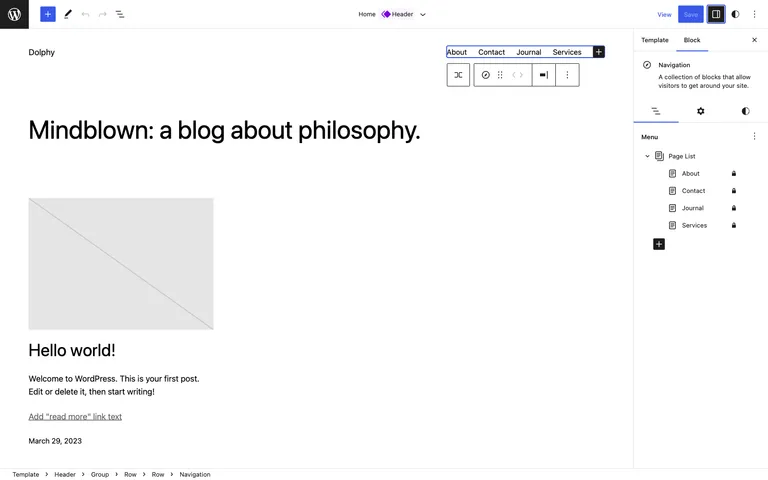
The Navigation block has been the roughest edge of full site editing, and 6.2 gives it the attention it needed. Menu management now lives in the block settings sidebar: select the Navigation block and you get a plain list of your menu items that you can add to, remove from, and reorder, instead of chasing the right element around the canvas.
New design tools: Style Book, copied styles, and custom CSS
Three additions here, all aimed at keeping a site’s design consistent.
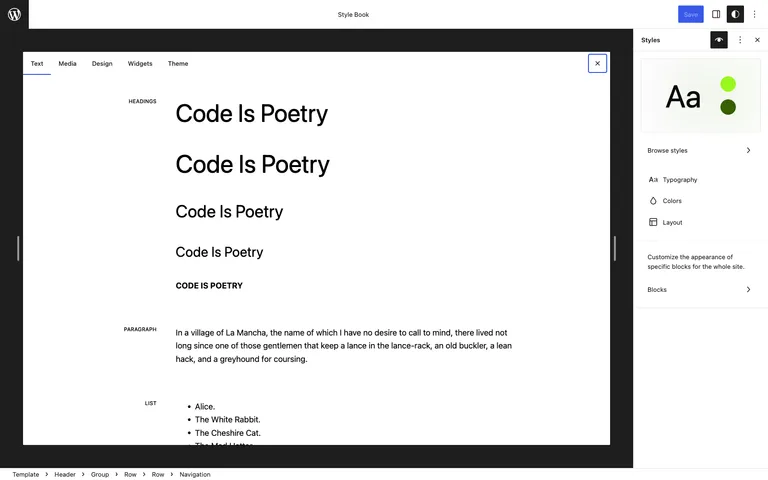
The Style Book shows every block in one place, styled the way your theme styles it. Open it from the Styles panel in the Site Editor and you can audit your whole design at a glance, rather than hunting for a page that happens to contain a pull quote so you can check what pull quotes look like.
Copy and paste styles does what it says: style one block the way you want it, copy its styles from the block toolbar, and paste them onto another block.
Custom CSS is now built into the Styles panel, site-wide or per block. Block themes hid the Customizer’s old Additional CSS screen, so until now a stray override meant reaching for a plugin. That gap is closed.
Openverse in the block inserter
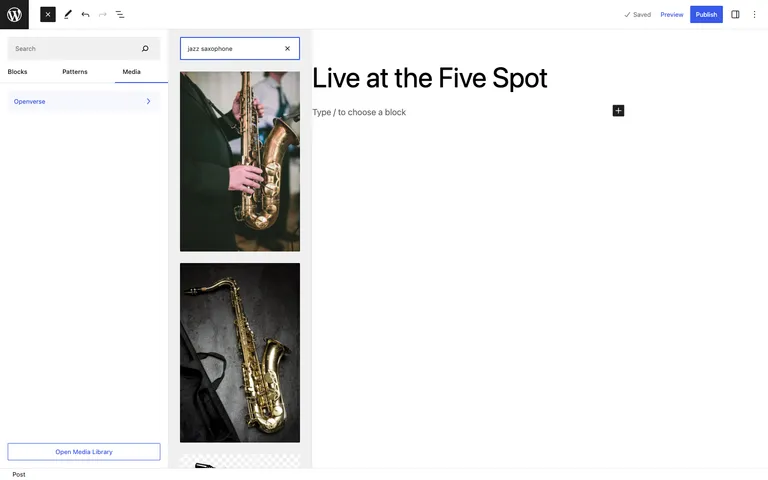
The block inserter picks up a new media experience. A Media tab lets you drop in images already in your library, and Openverse search is integrated directly: more than 700 million openly licensed images, searchable without leaving the editor. Insert one and WordPress adds the attribution and license to the image caption automatically, which beats the old routine of downloading, uploading, and writing the credit by hand.
Write without the clutter
Distraction-free mode hides the sidebars, panels, and toolbars so it’s just you and the content. Toggle it from the editor’s options menu, and everything comes back when you need it. If you draft long posts in the block editor, this is the quiet quality-of-life feature of the release.
Smaller changes worth knowing about
- Block settings tabs. The settings sidebar now splits into Settings and Styles tabs, so the controls you’re after are easier to find on complex blocks.
- Sticky positioning. Group blocks can now be made sticky, with one caveat: it only applies to Group blocks at the top level of the page, which covers the main use case of a sticky header.
- Widgets come with you. Switching from a classic theme to a block theme can now bring your existing widgets across as blocks.
- Header and footer patterns. New pattern collections give block themes professional starting points for the two template parts every site needs.
- Local fonts in default themes. The bundled Twenty Twelve through Twenty Seventeen themes now load their Google Fonts locally, a welcome change for privacy and for anyone dealing with GDPR.
For developers
Under the hood, 6.2 merges 10 Gutenberg releases (14.2 through 15.1) into core, and the field guide has a few items worth flagging:
- The HTML API. The new
WP_HTML_Tag_Processorclass lets you find tags and modify attributes in an HTML string from PHP, reliably, without regex gymnastics. Adding a class to an image or setting a data attribute on a link is now a few readable lines. - React 18. The block editor now runs on React 18, opening the door to concurrent rendering features.
move_dir(). A new filesystem function for moving directories, alongsidewp_opcache_invalidate_directory()for recursive OPcache invalidation.- Nicer email attachments.
wp_mail()now accepts an associative attachments array, so you can give attachments custom filenames. - Deprecation notice.
get_page_by_title()is deprecated. UseWP_Queryinstead.
Performance
The numbers from the core team are worth repeating: load time improvements of 14 to 18% for block themes and 2 to 5% for classic themes, with server-side performance gains of 17 to 23% for block themes and 3 to 5% for classic themes. The wins come from a pile of unglamorous caching work, including cached global settings and smarter query caching, which is exactly the kind of release note we like to see.
Updating to 6.2
As with any major release, take the boring precautions before you hit the button:
- Back up your site, or confirm your host’s latest backup is current.
- If you have a staging site, update there first and click through your key pages and forms.
- Update from your WordPress dashboard under Dashboard → Updates, then retest the front end.
On Wordify you can create a fresh backup and a staging copy from your dashboard before updating, which turns a risky click into a reversible one.
Wrapping up
WordPress 6.2 is available now from your dashboard or wordpress.org. For us the standout is the Site Editor leaving beta: it moves block themes from an interesting experiment to a genuine option for client work. Which change makes the biggest difference to your workflow? Let us know in the comments.