
WordPress 6.9 “Gene” Walkthrough: New Features and Updates
WordPress 6.9 shipped on December 2, 2025. Codenamed “Gene” after the jazz pianist Gene Harris, it delivers more than 340 enhancements and fixes from a crowd of over 900 contributors, 279 of them first-timers, with more than 30 accessibility fixes along the way.
Two features carry this release: proper editorial collaboration inside the editor, and a Command Palette that finally works everywhere in the dashboard. Around them sits a batch of new blocks and, for once, performance numbers worth quoting. Here’s the walkthrough.
Notes: reviews without the email thread
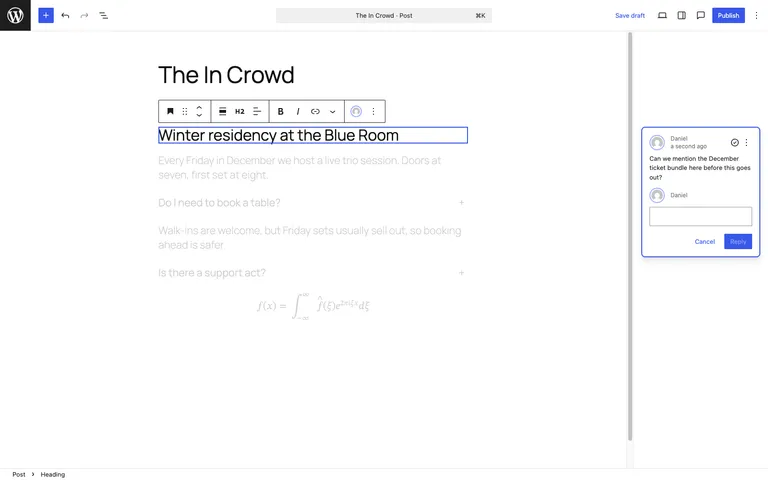
The marquee feature is Notes: you can now attach a note to any individual block in a post or page, and teammates can reply in a thread right there in the editor. “Can we soften this heading?” finally lives next to the heading instead of in an email, a Slack thread, or a Google Doc nobody updates. For agencies running content reviews with clients, this is the beginning of the end for copy-paste feedback rounds.
The Command Palette goes dashboard-wide
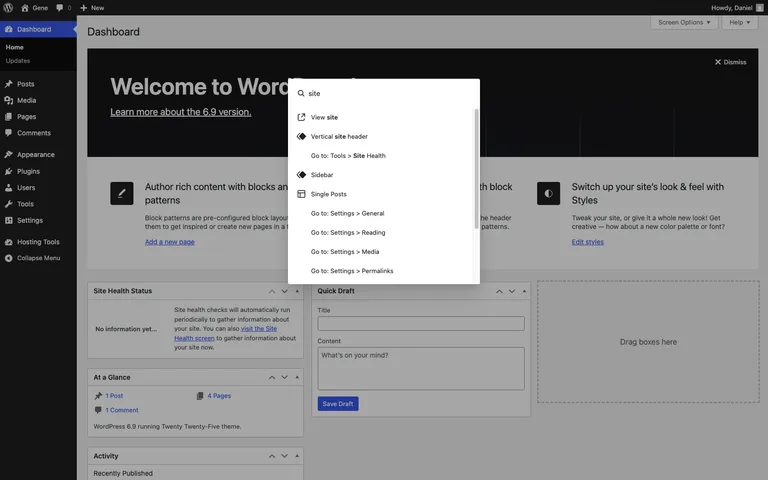
Since 6.3 the Command Palette has been the fastest way to move around the editor; in 6.9 it works across the entire admin. Press Ctrl + K (Cmd + K on a Mac) from any dashboard screen to jump to settings, content, or actions without touching the menu sidebar. Once your fingers learn it, the admin menu starts to feel decorative.
New blocks: Accordion, Math, and friends
6.9 ships a small family of new blocks:
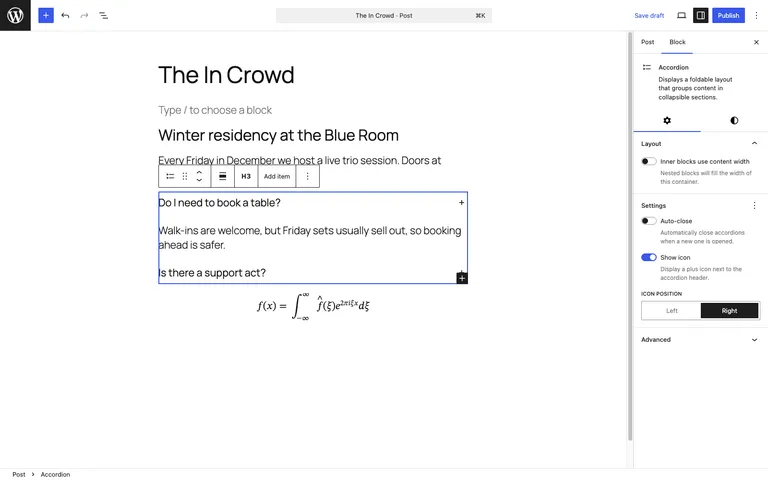
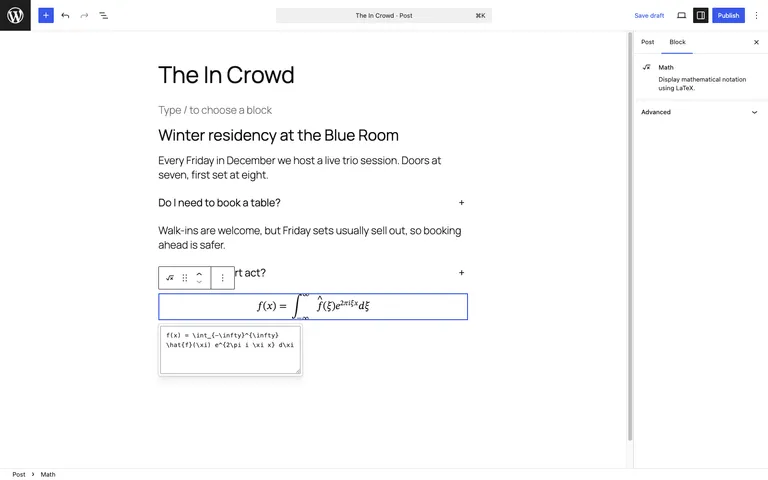
- Accordion, with proper heading, item, and panel sub-blocks. FAQ sections without a plugin, at last.
- Math, rendering MathML and LaTeX either as a block or inline.
- Terms Query plus term blocks for building category and tag listings, and new Comments Link and Comments Count blocks.
Small editor wins
- Fit text to container. A new typography option on Heading and Paragraph blocks automatically sizes text to fill its container, which is a designer trick that used to need custom CSS or a plugin.
- Hide blocks. Hide and reveal any block with one click, handy for staging seasonal content without deleting it.
- Real drag-and-drop in the Site Editor. Blocks move directly now, rather than via the old drag chip.
No new default theme, and that’s fine
Breaking with years of December tradition, 6.9 doesn’t ship a new default theme; Twenty Twenty-Five carries on. Given how flexible its nine style variations are, we’re not sure anyone will miss the annual theme churn.
For developers
- Abilities API. The strategic headline: a machine-readable registry for describing and executing site capabilities in a standardized way, shipped as part of the “AI building blocks” initiative. This is the plumbing that will let AI agents and automation tools interact with WordPress sites predictably.
- WP_Block_Processor. A new class for scanning block structure in HTML documents and getting back nested block info with parsed attributes.
- Field API and DataViews. More than 10 new field types with validation-aware edit controls and 16+ filter operators; DataViews gains infinite scroll and DataForms gains card and row layouts.
- Interactivity, HTML, and Block Bindings APIs all get incremental upgrades, including a new
attachToproperty for directives and a per-block-type bindings filter. - Platform. PHP 8.5 beta support arrives while PHP 7.2+ compatibility is maintained, and legacy Internet Explorer conditional-comment script loading is finally removed.
Performance: real numbers this time
The core performance team published concrete benchmarks for 6.9, and they’re good. On the bundled block theme, largest contentful paint improved by 18.9% and first contentful paint by 33.1% on the benchmarked sample page. Classic themes get on-demand block styles, cutting CSS payloads by about 45% on average across bundled themes. Even the long-forgotten corners got love: RSS feed responses are 87% faster thanks to caching. These are the strongest verified performance gains in a WordPress release in years.
Updating to 6.9
- Back up your site, or confirm your host’s latest backup is current.
- If you have a staging site, update there first and click through your key pages and forms.
- Update from your WordPress dashboard under Dashboard → Updates, then retest the front end.
On Wordify you can create a fresh backup and a staging copy from your dashboard before updating, which turns a risky click into a reversible one.
Wrapping up
WordPress 6.9 is available now from your dashboard or wordpress.org. Notes will change day-to-day life for teams the moment they find it, and the Abilities API is the one to watch for what WordPress becomes next. Which feature are you most excited about? Let us know in the comments.