
Random 503s, a maxed-out server, and traffic that looks normal? Bots may be looping through your WooCommerce filters
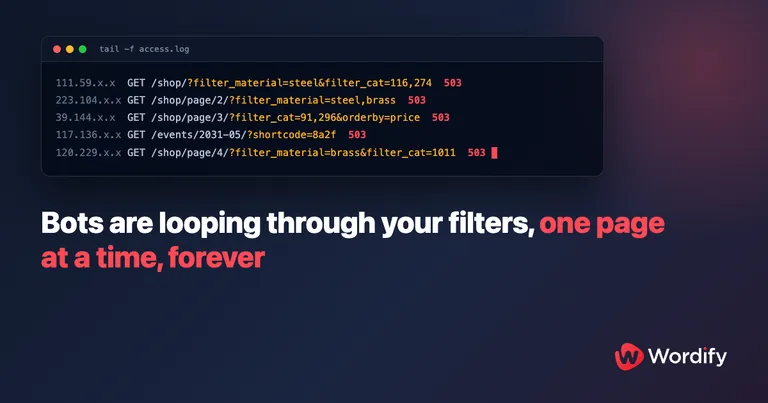
The site keeps going down. Uptime monitoring pings you, customers email you, and when you finally catch it in the act you see 503 errors and a hosting dashboard showing CPU flat against its ceiling.
So you go looking for the attack. And you find nothing. No traffic spike from any single visitor. No brute-force login attempts, your security plugin is bored. The top IP addresses in the logs look ordinary. The user agents are all Chrome and Edge and Googlebot. Every individual request looks like a normal person, or a normal search engine, browsing a normal page.
Meanwhile the server is working harder than it ever has in its life.
We’ve dug into this exact situation three times in Wordify support recently, on three different sites. In every case the culprit was the same: bot traffic stuck looping through an effectively infinite set of URLs that the site itself was generating. Product filters on a WooCommerce shop. Date archives on an events calendar. Pages no human ever visits, multiplying faster than any bot could ever finish crawling them.
Here’s what that looks like, why it flattens a server, why none of the usual defences notice it, and how to fix it properly.
Three sites, one underlying problem
An industrial parts shop. A WooCommerce store was hit by a distributed scraper walking every combination of its product filters. On the worst day, 391,725 requests hit the site and 99% of them were filter URLs, peaking around 1,900 requests a minute. The requests came from over 70,000 unique IP addresses in a single day, almost all making exactly one request each, with user agents faking current Chrome and Edge builds. Under that load, a single filtered category page was taking 41 seconds to generate.
A busy events site. A site running The Events Calendar started dropping offline intermittently. The first pass through the logs found nothing: top IPs and user agents looked normal, and the errors pointed at PHP process limits rather than traffic. The real cause only showed up when we searched by URL instead of by IP: 17,094 requests carrying a ?shortcode= query string, from 15,806 distinct IPs, roughly 96% of which made only one request each. The bots were crawling calendar tag pages and paginated day views up to page 36 and beyond.
A classical music store. No hostile scraper at all this time. Googlebot, GoogleOther, bingbot, PetalBot, and Ahrefs, well-behaved crawlers every one of them, were collectively hammering a WooCommerce store by looping endlessly through brand filter URLs like /category/cds/page/2?filtering=1&filter_product_brand=489,479,532,507,506. The links came from a leftover menu in the page footer that was hidden from human visitors. Bots don’t care whether a menu is visible. They followed every link, and the filter combinations never ran out.
Three different sites, three different kinds of bot, one shared anatomy. SEOs have a name for it: a crawl trap (sometimes “spider trap”), a page structure that generates an unbounded set of URLs for crawlers to wander into. Let’s take it apart.
Where the infinite URLs come from
Faceted navigation is a URL factory
Product filters (what SEOs call faceted navigation) let a shopper narrow a category by attribute: material, brand, size, price, colour. Every filter choice becomes part of the URL, usually as a query string:
/product-category/fittings/?filter_material=stainless
/product-category/fittings/?filter_material=stainless&filter_size=m6
/product-category/fittings/?filter_material=stainless,mild-steel&filter_size=m6&orderby=price
Each combination is a distinct URL. The count doesn’t grow linearly, it multiplies. Five filterable attributes with a handful of values each, times multi-select, times sort orders, times price ranges, and a modest catalogue of a few hundred products is suddenly advertising hundreds of thousands of unique pages. Add pagination and every one of those combinations sprouts its own /page/2/, /page/3/, and so on.
To a crawler, every one of those URLs is novel. Google’s own documentation on faceted navigation is blunt about what happens next: crawlers can’t tell whether a new URL is useful without fetching it first, so they “will typically access a very large number of faceted navigation URLs before the crawlers’ processes determine the URLs are in fact useless.” Google also notes that faceted navigation “tends to cost sites large amounts of computing resources due to the sheer amount of URLs and operations needed to render those pages.”
That’s the polite, rule-following case. A scraper that *wants* your whole catalogue doesn’t need an invitation, and it definitely doesn’t stop at useless.
Event calendars never end
A calendar plugin generates archives by date, and dates are infinite in both directions. Month views, day views, list views, category and tag views, each with its own pagination, each with a “next” link leading to another valid page. The Events Calendar, active on over 600,000 WordPress sites, also responds to query parameters like ?shortcode= on those views, which multiplies the space again: the same page content behind an unbounded set of URLs.
On the events site above, the scraper had worked its way through paginated day views to page 36. There is always a page 37.
The links that let bots in
An infinite URL space is only a problem once something starts walking it. The entry points we’ve seen:
- Filter widgets themselves. Every filter link your theme prints into the page is a doorway.
- Leftover, hidden markup. The classical music store’s filter links came from an old menu that was hidden with CSS. Humans never saw it; crawlers read the HTML, not the stylesheet.
- Nothing at all. A deliberate scraper can construct filter URLs itself once it’s seen the pattern. If your shop responds to
?filter_material=, a bot can enumerate values without ever being linked to them.
Why it hits the server so hard
Query strings bypass the page cache
Well-configured WordPress hosting serves most anonymous traffic from a page cache. A cached page costs the server almost nothing; that’s why a modest plan can happily serve a big audience.
Filter URLs break that. Because each combination is unique, and because page caches quite reasonably treat unknown query strings as “this might be a different page,” nearly every request is a cache miss. Every miss means WordPress boots, the theme renders, WooCommerce runs its product queries, and MySQL does real work. The scraper isn’t just making a lot of requests, it’s making the most expensive kind of request, exclusively, at a rate no human audience ever would.
That’s the difference between this and a normal busy day. A traffic spike from real visitors mostly lands on a handful of cacheable pages. A crawler in a filter space lands on a different uncacheable page every single time.
Some URLs are worse than uncacheable
The scraper hitting the parts shop wasn’t only requesting filter pages. It was also following URLs like:
/product-category/mild-steel/page/2/?add-to-cart=796&filter_tax_product_cat=219,274,883
/cart-2/?_wpnonce=72270a8599&remove_item=912d2b1c7b2826caf99687388d2e8f7c
?add-to-cart= doesn’t just render a page, it creates a session and writes a cart to the database. Thousands of one-request IPs each adding a product to a cart means thousands of sessions and carts, none of which will ever check out, all of which cost writes and memory. Session-bearing traffic is uncacheable by design, so this class of URL turns a crawl into a load test.
The spiral into 503s
Put it together: expensive pages, requested in bulk, none of them cacheable. Page generation slows down as the database saturates. Slower pages mean more PHP workers held open at once. Eventually the account hits its process and memory limits, and the server starts refusing requests: HTTP 503, for the bots and for your real customers alike. On the events site the platform metrics told the story plainly: process-limit faults by the thousand per hour, memory pinned at its cap, and a stream of 503s, all while the traffic *looked* normal.
Why nothing catches this kind of bot traffic
This is the part that makes these cases genuinely hard, and it’s why two of the three investigations initially concluded “no bot attack.”
Good bots are supposed to be there. Googlebot crawling your shop is the system working as intended. There’s no malice to detect, and no single request is unreasonable. The problem is the sum: an honest crawler, an infinite space, and a site that keeps saying “here are more links.” And the queue of honest crawlers keeps growing: in the parts shop’s logs, alongside the search engines, we watched OpenAI’s GPTBot and OAI-SearchBot politely fetch robots.txt and head into the same unbounded filter space.
Bad bots don’t look like bots anymore. The scrapers in our two hostile cases were distributed across enormous pools of residential and proxy IPs, mostly one request per IP, with rotating, current browser user agents. Every per-IP defence sees a stranger making one polite request. Rate limiting doesn’t trigger. DoS protection doesn’t trigger. Bot-detection heuristics that worked five years ago don’t trigger. On the parts shop, both our platform-level protections and Cloudflare’s bot defences stayed silent, because nothing about any individual request was abnormal.
The fingerprint is in the URLs, not the IPs. The only reliable tell in all three cases was the request pattern itself: a firehose of distinct filter or calendar URLs that no human browsing session would ever produce. If you analyse your logs by IP address, you’ll find nothing. Analyse them by URL shape and the problem lights up.
Diagnose it in ten minutes
If your site is slow or throwing 503s and nothing obvious explains it, pull a day of access logs and run these against them. (On Wordify, support will happily do this with you; these examples assume a standard combined log format.)
1. What share of requests carry a query string?
total=$(wc -l < access.log)
qs=$(grep -c 'GET /[^ ]*?' access.log)
echo "$qs of $total requests have a query string"
On most sites, query-string requests are a small minority of traffic. If they’re anywhere near half, look closer.
2. Which parameters dominate?
grep -o 'GET /[^ ]*' access.log \
  | grep -o '[?&][a-z_]*=' \
  | sort | uniq -c | sort -rn | head
If filter_, min_price, orderby, add-to-cart, shortcode, or eventDate parameters top the list at volume, you’ve likely found it.
3. The one-request-per-IP fingerprint.
grep 'filter_' access.log | wc -l
grep 'filter_' access.log | awk '{print $1}' | sort -u | wc -l
If those two numbers are close, requests and unique IPs, you’re looking at a distributed scraper. Real shoppers filter a category a few times from one IP; a botnet sends one request each from thousands.
4. Are the expensive URLs the slow ones? If your host exposes response times or cache hit/miss headers, confirm the query-string URLs are missing cache. A quick spot check with curl:
curl -sI 'https://example.com/product-category/fittings/?filter_material=stainless' | grep -i 'cache\|x-'5. Check Google Search Console. Under Settings, Crawl stats, a sudden multiple-of-normal jump in pages crawled per day, or an exploding count of “Discovered, currently not indexed” pages, is Google telling you it found a URL factory on your site.
Fixing it, part one: stop inviting the good bots
For legitimate crawlers, the fix is to stop advertising infinite URLs, and to say clearly which URL spaces aren’t worth crawling. Both halves matter.
Tell crawlers where not to go with robots.txt
This is the ruleset we now recommend for WooCommerce shops with attribute filters, and it’s what resolved the good-bot side of the cases above. Add it to your robots.txt under User-agent: *:
# Faceted navigation: unbounded URL space, no crawl value.
# The generic "filter_" prefix covers every current and future attribute filter.
Disallow: /*?filter_
Disallow: /*?*filter_
Disallow: /*?*query_type_
Disallow: /*?*min_price=
Disallow: /*?*max_price=
Disallow: /*?*orderby=

# Cart and session-creating actions: these must never be crawled.
Disallow: /*?add-to-cart=
Disallow: /*?*add-to-cart=
Disallow: /*?*remove_item=
Disallow: /*?*_wpnonce=
The doubled patterns (/*?filter_ and /*?*filter_) catch the parameter whether it appears first or after other parameters. Google documents * wildcard support in every robots.txt rule, and its faceted navigation guidance recommends exactly this approach, blocking filter parameters by pattern, when you don’t need filtered pages indexed.
For an events site, the equivalent is to disallow the parameters and deep date archives that generate unbounded URLs. What’s safe to block depends on which views you actually use, but on the site above, the ?shortcode= parameter was only ever produced by bots, because the site didn’t embed calendar shortcodes anywhere. Check before you block, then block with confidence.
Two honest caveats about robots.txt:
- It’s advisory. In Google’s own words, “it’s up to the crawler to obey them.” Reputable search engines and most AI crawlers comply. The scrapers in our two hostile cases would not have cared.
- It controls crawling, not indexing. A blocked URL that’s linked from elsewhere can still end up in the index as a bare URL. That’s fine here: the goal is to stop the crawl load, not to tidy search results. There’s an SEO upside too: Google notes that crawling spent on useless URLs leaves less time for the useful ones, so the crawl budget you reclaim from filter permutations goes back to the products and pages you actually want indexed.
One thing we’d steer you away from: don’t try to fix crawl load with noindex alone. Google has to fetch a page to see a noindex tag, so every one of those requests still costs you the PHP and database work. Robots.txt stops the request itself.
Emit fewer crawlable filter links
Robots.txt asks crawlers to stay out. It’s even better not to pave the road in the first place:
- Audit your templates for forgotten links. The classical music store’s whole incident traced back to a hidden leftover menu full of filter links. If it’s in the HTML, bots will follow it, hidden or not. If you don’t need it, delete it.
- Use your theme’s AJAX filtering if it has it. Many WooCommerce themes (Blocksy, for example, under Customizer, WooCommerce, Product Archives) can apply filters via AJAX without a full page reload. Real customers get faster filtering, and depending on the implementation fewer filter permutations get emitted as plain crawlable links. It won’t stop a determined scraper, but it shrinks the invitation.
- Prefer filter UIs that don’t mint URLs. Google’s guidance notes that filters implemented with URL fragments (
#filter=...) have no crawling impact at all, because fragments never reach the server.
Fixing it, part two: stop the bots that don’t ask permission
A scraper that wants your data ignores robots.txt. For those, the answer moves from persuasion to enforcement, and the order matters.
Don’t start an IP arms race
Blocking the offending IP ranges and user-agent strings feels like the obvious move, and it does work, briefly. On the parts shop we blocked the ranges and browser signatures the scraper was using, and within days it came back from different ranges with different browser versions. When your adversary has tens of thousands of IPs, per-IP blocking is a treadmill, not a fix.
Block the URL fingerprint at the edge
What actually worked, in both hostile cases, was blocking the *request shape* rather than the requester, as close to the edge as possible.
On the events site we added a server rule that drops any request containing ?shortcode= before it reaches PHP (nginx can answer these with status 444, which simply closes the connection). The effect was immediate: within about a minute, memory use fell from 3 GB, hard against its limit, to around 650 MB, process-limit faults stopped entirely, and the site recovered. The scraper kept scraping for a while; it just stopped costing anything.
The same idea works one notch gentler: when the loop is good bots rather than a scraper, answering the looping URLs with HTTP 429 (Too Many Requests) tells well-behaved crawlers to back off without affecting the rest of the site. Google documents that its crawlers treat a 429 as a signal the server is overloaded and temporarily slow down. That’s how we broke the Googlebot loop on the classical music store while the underlying menu got removed.
A word of caution before you block: make sure the pattern you’re blocking carries no legitimate traffic. We confirmed the events site never used calendar shortcode embeds, so ?shortcode= there was 100% bot-generated. On a site that does use them, the same block would break real pages.
Challenge at the CDN
If you’re behind Cloudflare or a similar CDN, you can enforce this without touching the server. On the parts shop, two custom rules ended a fight that per-IP blocking had been losing for days:
- A managed challenge on requests matching the filter URL patterns. Most humans are verified automatically without seeing anything; headless scrapers fail and never reach the origin.
- A geographic rule for the region the scraper operated from, first as a challenge, then, at the customer’s request, as an outright block.
Both rules explicitly exempted Cloudflare’s verified bots (Googlebot, Bingbot, and other crawlers that identify themselves honestly), so search engines continued crawling the pages that mattered. And note what this isn’t: it isn’t Under Attack Mode, which challenges every visitor to every page and degrades the experience for everyone. Used as a scoped rule on the abusive URL pattern, a challenge is invisible to virtually all real customers. Under Attack Mode is a fine break-glass switch while you set up the real rules; it’s not a place to live.
Rate limit the expensive endpoints
Independent of any specific incident, dynamic WooCommerce endpoints (filtering, add-to-cart, cart, checkout) are good candidates for rate limiting at the server or CDN, generous enough that no human ever hits it, tight enough that one client enumerating your filter space runs into a wall. It’s cheap insurance against the next crawler.
What doesn’t fix it
A bigger hosting plan. This is the tempting one, because the graphs genuinely show you running out of resources. On the events site, the first-pass diagnosis was exactly that: the site is hitting its limits, consider upgrading. It was true and useless. The account’s normal workload fit comfortably inside its plan; the scraper would have consumed any plan you gave it. Buy resources for your audience, not for a botnet. (The reverse also happens: if your real audience has outgrown your plan, no robots.txt will save you. The log analysis above tells you which situation you’re in.)
Your security plugin. Login protection and malware scanning don’t see anything wrong here, because nothing they check for is happening. This traffic is “legitimate” page views, just infinitely many of them.
Waiting it out. The parts shop scraper ran for weeks and adapted to the first block thrown at it. Distributed scraping is cheap for whoever runs it. The economics only change when their requests stop yielding pages.
The ten-minute takeaway
If a WooCommerce or events site is slow or serving 503s and there’s no traffic spike to blame:
- Check the URL shape of your traffic, not the IPs. Query-string share, dominant parameters, requests versus unique IPs. A firehose of one-request IPs on filter URLs is a distributed scraper; steady filter crawling from Googlebot and friends is an invitation problem.
- Close the invitation. Robots.txt disallow rules for filter, sort, price, and cart parameters; remove leftover crawlable filter links; use AJAX filtering where your theme offers it.
- Enforce against scrapers by URL pattern, not IP. Edge or CDN rules that drop or challenge the abusive request shape, with verified search crawlers exempted.
- Rate limit your expensive endpoints so the next bot hits a wall instead of your database.
- Don’t buy a bigger plan to feed a botnet. Fix the crawl first, then size the plan for your actual audience.
Bots aren’t going away. Cloudflare measured AI and search crawler traffic growing 18% in the year to May 2025, with OpenAI’s GPTBot alone up 305%. A site that generates infinite URLs will eventually find a bot willing to fetch all of them. Make sure the meter isn’t running on your server when it does.
Frequently asked questions
Why is Googlebot crawling thousands of filter URLs on my site?
Because every filter combination is a unique URL, and Googlebot can’t know a URL is useless until it fetches it. Google’s own documentation says crawlers will typically access a very large number of faceted navigation URLs before concluding they’re not useful. It isn’t a penalty or a bug; it’s an honest crawler doing its job in a space with no exit. The fix is to close the space: robots.txt rules for the filter parameters, and fewer crawlable filter links in your templates.
Will blocking filter URLs in robots.txt hurt my rankings?
Not if your product, category, and content pages stay crawlable. Filtered permutations are thin near-duplicates of your category pages, and Google’s faceted navigation guidance explicitly recommends blocking them by pattern when you don’t need them indexed. You’re not hiding anything Google wanted; you’re freeing crawl budget for the pages that earn rankings.
Why didn’t Cloudflare or my security plugin stop the bots?
Because nothing about any individual request looked wrong. Modern scrapers distribute their traffic across tens of thousands of residential IPs, one polite request each, with current browser user agents. Per-IP rate limits, DoS heuristics, and bot scores all watch the requester, and every requester looked human. Security plugins watch for logins and malware, and there were none. The tell is the request pattern: thousands of distinct filter URLs no human session would ever produce. Defend on that pattern, not on IPs.
Should I block AI crawlers like GPTBot entirely?
That’s a business decision, but make it per URL space, not site-wide by reflex. Blocking AI crawlers from filter and cart URLs costs you nothing and saves real server resources. Blocking them from your actual content also removes you from AI search results and assistant answers, which is where a growing share of discovery now happens. The major AI crawlers use robots.txt (OpenAI documents that robots.txt changes reach its crawlers within about a day, and honest crawling behaviour is a condition of Cloudflare’s verified bots list), so a scoped disallow gives you the savings without the disappearance.
Wordify handles the hosting, caching, security, and backups, with support that actually reads the access logs when something’s wrong. Free site migrations on every paid plan, usually within an hour.