
Fixed: WP Rocket fatal error after WordPress 7.1: Uncaught TypeError: substr(): Argument #1 ($string) must be of type string, int given in Cloudflare.php:562
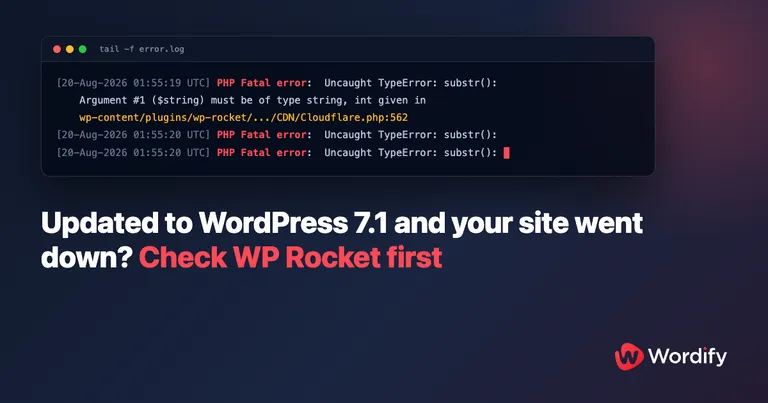
Updated August 20, 2026: there’s now a fix. WP Media has released WP Rocket 3.23.2.2, which fixes this fatal error, and we’ve verified the fix end to end on our own test site. The permanent solution is updating WP Rocket to 3.23.2.2. If your site is down right now, the steps below get it back in about a minute first, then update.
You updated to WordPress 7.1 and your site went down. Depending on your setup, that looks like a completely white screen or the generic “There has been a critical error on this website.” page. It’s not just the front end either: wp-admin is down, admin-ajax and the REST API are down, and if you try WP-CLI over SSH, even that crashes.
If the site runs WP Rocket, you’re almost certainly hitting a bug that started taking sites down within hours of the WordPress 7.1 release on August 19. We’ve fixed it on customer sites at Wordify and reproduced it end to end on a test site. Here’s the exact error, the 60-second rescue if you’re down right now, the permanent fix (updating WP Rocket to 3.23.2.2), and what actually went wrong.
The error
Check your PHP or server error log and you’ll find this on every single request:
PHP Fatal error:  Uncaught TypeError: substr(): Argument #1 ($string) must be of type string,
int given in .../wp-content/plugins/wp-rocket/inc/ThirdParty/Plugins/CDN/Cloudflare.php:562
Stack trace:
#0 .../wp-content/plugins/wp-rocket/inc/ThirdParty/Plugins/CDN/Cloudflare.php(562): substr()
#1 .../wp-content/plugins/wp-rocket/inc/ThirdParty/Plugins/CDN/Cloudflare.php(535): WP_Rocket\ThirdParty\Plugins\CDN\Cloudflare->unregister_callback()
#2 .../wp-includes/class-wp-hook.php(353): WP_Rocket\ThirdParty\Plugins\CDN\Cloudflare->unregister_cloudflare_clean_on_post()
#3 .../wp-includes/class-wp-hook.php(377): WP_Hook->apply_filters()
#4 .../wp-includes/plugin.php(523): WP_Hook->do_action()
#5 .../wp-settings.php(779): do_action()
#6 .../wp-config.php(102): require_once('...')
#7 .../wp-load.php(50): require_once('...')
#8 .../wp-blog-header.php(13): require_once('...')
#9 .../index.php(17): require('...')
#10 {main}
  thrown in .../wp-content/plugins/wp-rocket/inc/ThirdParty/Plugins/CDN/Cloudflare.php on line 562
On screen, you might see nothing useful at all. The fatal fires while WordPress is still booting, so a white screen, the critical error page, and (if you have WP_DEBUG_DISPLAY enabled) the raw stack trace in the browser are all the same failure. Turning on WP_DEBUG won’t necessarily show anything on screen either. The error log is the reliable place to look.
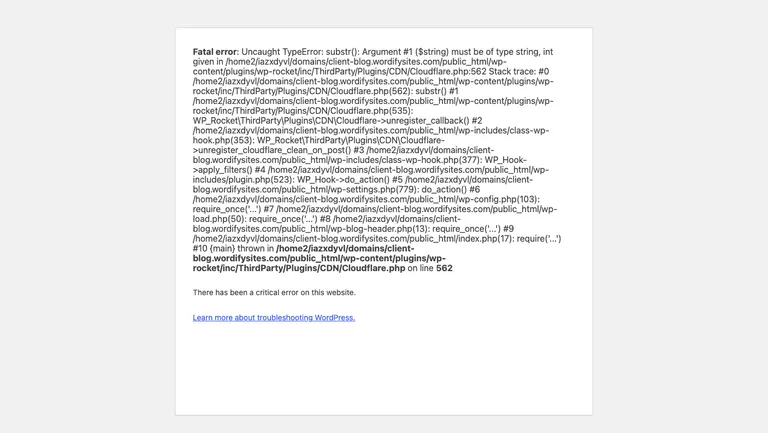
The line that matters is the last one: wp-rocket/inc/ThirdParty/Plugins/CDN/Cloudflare.php on line 562. This is a bug in WP Rocket, not in WordPress core, and not something your host broke. It affects WP Rocket 3.23.2.1 and earlier, and the fix is WP Rocket 3.23.2.2, released August 20, 2026. The catch: a site that’s already fatally erroring can’t update anything from wp-admin, so if you’re down, deactivate first.
The 60-second fix: deactivate WP Rocket
The trap with this error is that the normal fix path is dead. You’d usually deactivate the broken plugin from the WordPress admin, but wp-admin is throwing the same fatal as the front end.
If your site is on Wordify
The Wordify Console talks to your server directly rather than through WordPress, so it keeps working while your site can’t. You don’t need SSH and you don’t need to wait for support:
- Log in to the Wordify Console.
- Open your site, then go to WordPress and select Plugins.
- Find WP Rocket and switch its Status toggle to inactive.
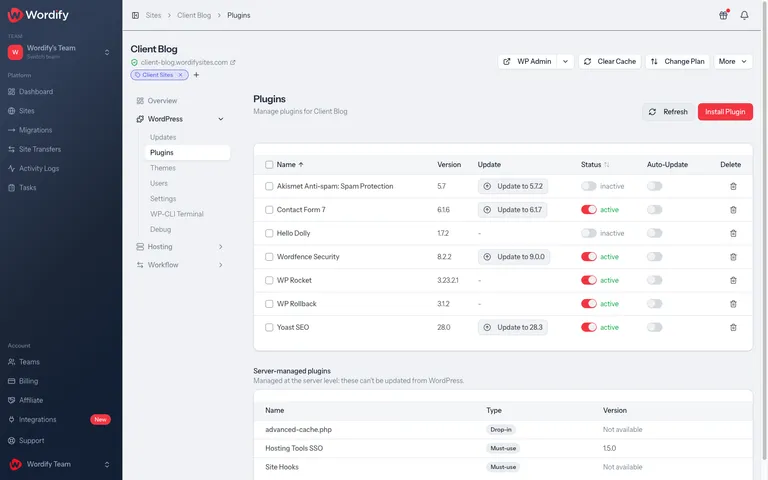
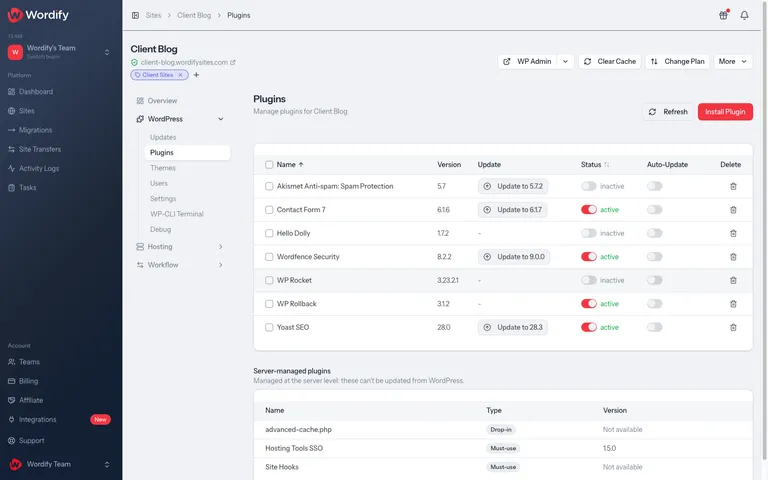
Reload your site. It comes back immediately, because the fatal fired on every request and deactivating the plugin removes the broken code path entirely.
If you host elsewhere
You have two reliable options:
WP-CLI over SSH. The catch: WP-CLI loads WordPress, plugins included, so on an affected site it dies with the same fatal. Tell it to skip WP Rocket while it does the deactivation:
wp plugin deactivate wp-rocket --skip-plugins=wp-rocketRename the plugin folder over SFTP. Renaming wp-content/plugins/wp-rocket to anything else (for example wp-rocket.off) makes WordPress treat the plugin as deactivated on the next request.
One warning: don’t try to surgically delete the Cloudflare.php file inside WP Rocket. The class is wired into the plugin’s dependency container, and removing it just swaps this fatal for a different one. Deactivate the whole plugin.
After your site is back: update WP Rocket, then reactivate
With the site responding again, update WP Rocket to 3.23.2.2, then reactivate it. Both steps work from the same Console Plugins page, or from wp-admin, which is alive again while the plugin is inactive. There’s no rush between the steps either: on Wordify your pages are still served through SmartCache, our server-level page cache, while WP Rocket is deactivated.
We’ve verified the fix end to end on our test site: we restaged the exact crash on 3.23.2.1 under WordPress 7.1, applied 3.23.2.2, and the site came straight back, front end and wp-admin healthy and the error log silent. The entire change is the one-line string cast suggested in the original bug report (WP Media’s fix), so confidence in the update as the resolution is high.
One caution from WP Media’s support article on this bug: if no update appears against WP Rocket in your plugin list, follow their missing-update guide (or ask us, if you’re on Wordify) rather than reactivating the version you have. Reactivating 3.23.2.1 or earlier on WordPress 7.1 just takes the site straight down again.
If you decide to remove WP Rocket entirely rather than update, deactivate it before deleting it, and read our guide to stale pages after removing a caching plugin first: caching plugins leave drop-in files behind, and deleting them the wrong way creates a different mess.
Haven’t updated to WordPress 7.1 yet? Update WP Rocket first
If your site runs WP Rocket and is still on WordPress 7.0.x, update WP Rocket to 3.23.2.2 before you take the core update, and before auto-updates take it for you: 7.1 auto-updates are rolling out across the WordPress ecosystem this week, so a site that nobody touches can still go from fine to down overnight. Once WP Rocket is on 3.23.2.2, WordPress 7.1 is safe from this particular bug.
Weighing up the update itself? Our WordPress 7.1 walkthrough covers what’s new, what didn’t ship, and what to test on staging when you’re ready.
If the site is on Wordify, this is also the kind of failure Automated Safe Updates is built to catch. On its default core setting, Minor & security only, a site is never moved to 7.1 automatically at all: it stays on 7.0.x until you choose. If core is set to all updates, Wordify loads the site before and after the update and compares what comes back, and a site returning a fatal error on every request fails that health check, so the update is rolled back and the 7.1 release put on hold.
What’s actually going wrong
Three things combine here, and each one is harmless on its own.
WordPress 7.1 changed how hook callback IDs are built. When a plugin hooks a closure or an object method to an action, WordPress generates a unique ID for it in _wp_filter_build_unique_id(). Up to WordPress 7.0.x that ID came from spl_object_hash(), a 32-character hex string. WordPress 7.1 switched to spl_object_id(), which produces a small number:
// WordPress 7.0.x: object hook IDs were long hex strings
return spl_object_hash( $callback[0] ) . $callback[1];   // "000000004b6c8e0d..."

// WordPress 7.1: object hook IDs are now numeric strings
if ( is_object( $callback ) ) {
    return (string) spl_object_id( $callback );          // "5292"
}
PHP silently turns numeric string keys into integers. When "5292" is used as an array key in the $wp_filter hooks table, PHP stores it as the integer 5292. So as of WordPress 7.1, any closure hooked to an action has an integer key in the hooks table. Before 7.1, every key was a string.
WP Rocket assumes those keys are strings, with strict typing on. On every request, WP Rocket’s Cloudflare compatibility module runs on the init hook, whether or not you use Cloudflare or have the Cloudflare plugin installed. It walks every callback registered on the deleted_post and transition_post_status hooks and calls substr() on each key:
// wp-rocket/inc/ThirdParty/Plugins/CDN/Cloudflare.php:562
foreach ( $original_wp_filter[ $priority ] as $key => $config ) {
    if ( substr( $key, - strlen( $method ) ) !== $method ) {   // TypeError when $key is an integer
Cloudflare.php declares strict_types=1, so PHP refuses to convert the integer key to a string and throws the fatal TypeError instead.
The final ingredient is any other plugin or theme that hooks a closure on deleted_post at priority 10, or on transition_post_status at PHP_INT_MAX. On the first site we fixed, that closure came from Elementor Pro, and WP Rocket plus Elementor Pro is a very common pairing. To be clear, Elementor Pro is doing nothing wrong: hooking closures is completely normal WordPress code, and it’s the reason plenty of sites hit this bug the moment they touched 7.1.
Because the crash happens on init, it kills every entry point: front end, wp-admin, admin-ajax, REST, cron, and WP-CLI. That’s why the usual recovery routes don’t work.
Who’s affected
Your site can hit this fatal if all three of these are true:
- WordPress 7.1, released August 19, 2026 and rolling out via auto-updates now.
- WP Rocket 3.23.2.1 or earlier with the Cloudflare compatibility module, which covers recent versions going back roughly to 3.16. The fix shipped in 3.23.2.2 on August 20; very old versions predate the code and are unaffected.
- Any plugin or theme hooking a closure on
deleted_post(priority 10) ortransition_post_status(priorityPHP_INT_MAX). Elementor Pro is one widespread example, but any plugin can be the trigger.
Being fully up to date on release day didn’t protect anyone: the first affected site we saw was running the then-latest WP Rocket. The bug was reported to WP Media on GitHub as issue #8596 on July 6, during the WordPress 7.1 beta, six weeks before release. Two more reports (#8740, #8741) landed the day after release, and WP Media shipped 3.23.2.2 later that same day: exactly the one-line change the original report suggested.
How this played out at Wordify
The first broken site reached our support team within hours of the 7.1 release. The customer’s site updated its core files at 01:55 UTC, and the first fatal appeared in the error log three seconds later. The customer opened a chat five minutes after that, support traced the fatal to WP Rocket in the PHP error logs, deactivated it, and the site was back. About 35 minutes end to end, and most of that was diagnosis, because at that point nobody had connected WordPress 7.1 to WP Rocket yet.
That’s what this post is for. With the error signature above, the fix is about a minute: toggle the plugin off in the Console, reload, done.
Updates shouldn’t be able to do this to you
The uncomfortable part of this story is that nobody did anything wrong. A stable WordPress release, a fully updated premium plugin, a routine update, and the site still went down hard, with every normal recovery path dead.
This is exactly why we built updates at Wordify to fail safely. With Auto Updates, Wordify applies core, plugin, and theme updates for you, with a backup taken before anything changes and a health check on your site afterwards. If a site stops responding after an update, updates pause and we notify you straight away, so a broken update becomes a message in your inbox instead of a morning of downtime nobody noticed. And when something does slip through, this incident shows the other half of the answer: the Console can list, deactivate, and update plugins even while WordPress itself is fatally erroring.
If your current host leaves you SSH-ing into a broken site to rename plugin folders, we’ll migrate you to Wordify for free, and there’s a 100% money-back guarantee in your first month.
Frequently asked questions
Is WordPress 7.1 itself broken?
No. The change to hook callback IDs is a legitimate core improvement, and sites without WP Rocket are unaffected by this particular fatal. The bug is WP Rocket’s assumption that hook keys are always strings.
Does updating WP Rocket fix the substr() fatal error?
Yes. WP Rocket 3.23.2.2, released August 20, 2026, fixes it; the changelog entry reads “Fixed the Fatal Type Error appearing after update to WordPress Core 7.1 in some configurations”. Everything from roughly 3.16 through 3.23.2.1 remains affected, so update before you reactivate, and before you update WordPress core. If your site is already down, deactivate WP Rocket first (steps above), then update, then reactivate.
I don’t use Cloudflare. Why is WP Rocket’s Cloudflare code crashing my site?
WP Rocket’s Cloudflare compatibility module runs on every request regardless of whether the Cloudflare plugin is installed or a Cloudflare account is connected. You don’t need to use Cloudflare to be affected.
Why does WP-CLI crash too, and how do I get around it?
WP-CLI loads WordPress, including active plugins, so it hits the same fatal on init. Add --skip-plugins=wp-rocket to any command you run on an affected site, including the deactivation command itself.
Will my site be slow with WP Rocket deactivated?
If your host does server-level page caching, most of what WP Rocket was doing for anonymous visitors is still covered. On Wordify, SmartCache keeps serving cached pages either way. And the gap is now minutes, not weeks: update WP Rocket to 3.23.2.2 and reactivate it.
Can I roll back to WordPress 7.0.4 instead?
Restoring a backup taken before the update, or rolling core back to 7.0.4, does work. But deactivating WP Rocket, updating it to 3.23.2.2, and reactivating is faster, safer, and doesn’t discard anything, so it should be your first move.